Scrapped Uniforms: Difference between revisions
Jump to navigation
Jump to search
add mantle 1 |
m add note for skin application Tags: Visual edit Mobile edit Mobile web edit |
||
| (2 intermediate revisions by the same user not shown) | |||
| Line 2: | Line 2: | ||
==Gallery== | ==Gallery== | ||
{{Gallery | The following Mantle skins are made in mind for the slim skin type. | ||
In order to apply the overlay, simply put it on top of your skin in the image editor of your choice. Your second layer might end up on top of the overlay, in which case remember to erase it from your skin.{{Gallery | |||
|title=Mantle 1 | |title=Mantle 1 | ||
|align = left | |align = left | ||
| Line 11: | Line 13: | ||
|file:Mantle 1.png | |file:Mantle 1.png | ||
|Skin file | |Skin file | ||
| | |style=image-rendering: pixelated; | ||
}}<br> | |||
{{Gallery | |||
|title=Mantle 1.5 | |||
|align = left | |||
|file:Mantle 1.5 Render Front.png | |||
|Render Front | |||
|file:Mantle 1.5 Render Back.png | |||
|Render Back | |||
|file:Mantle 1.5.png | |||
|Skin file | |||
|style=image-rendering: pixelated; | |||
}} | |||
{{Gallery | |||
|title=Mantle 2 | |||
|align = left | |||
|file:Mantle 2 Render Front.png | |||
|Render Front | |||
|file:Mantle 2 Render Back.png | |||
|Render Back | |||
|file:Mantle 2.png | |||
|Skin file | |||
|style=image-rendering: pixelated; | |||
}} | |||
{{Gallery | |||
|title=Mantle 2.1 | |||
|align = left | |||
|file:Mantle 2.1 Render Front.png | |||
|Render Front | |||
|file:Mantle 2.1 Render Back.png | |||
|Render Back | |||
|file:Mantle 2.1.png | |||
|Skin file | |||
|style=image-rendering: pixelated; | |||
}} | }} | ||
Latest revision as of 12:19, 25 November 2025
This page contains a handful of uniforms (overlays for Minecraft skins) which were originally created for the guild members to wear, but now it was decided against this idea. For the curious, the following skin overlays were drawn by Miv2nir (me).
Gallery
The following Mantle skins are made in mind for the slim skin type.
In order to apply the overlay, simply put it on top of your skin in the image editor of your choice. Your second layer might end up on top of the overlay, in which case remember to erase it from your skin.
Mantle 1
-
 Render Front
 -
 Render Back
 -
 Skin file


Mantle 1.5
-
 Render Front
 -
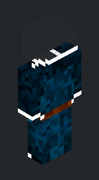 Render Back
 -
 Skin file


Mantle 2
-
 Render Front
 -
 Render Back
 -
 Skin file


Mantle 2.1
-
 Render Front
 -
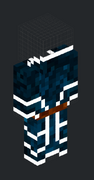 Render Back
 -
 Skin file


